

Relationship mapBETA
The relationship map in Curade Mini draws what a problem, application, service or host connects to, and puts each item's readings on the map.
On this page
The Relationship Map on a problem, application, service or host page draws what that item connects to, so the reach of a problem reads as a shape rather than a list. Every connection on it is one monitoring recorded itself: the map adds nothing and guesses nothing. It carries a BETA badge while it is still being tested.

What it draws
The map reaches two steps from the item the page is about, and draws every branch whole. A branch with many nodes folds behind a count you tap to see the rest.
| Page | What the map draws |
|---|---|
| Service | What calls it, the hosts it runs on, and what it calls, each with its own hosts |
| Host | The services on it, each with what calls it |
| Application | The services it calls, each with its hosts |
| Problem | The applications, services and hosts the problem names, with each service's hosts and each host's services |
On a service, host or application page, the map also draws, faded, the calls monitoring knows from the last few days that carried no request in your time window, so a quiet dependency stays in view.
Only applications, services and hosts appear, since those are the items with pages of their own. Every node a role can open carries View details, which opens its page.
Colours
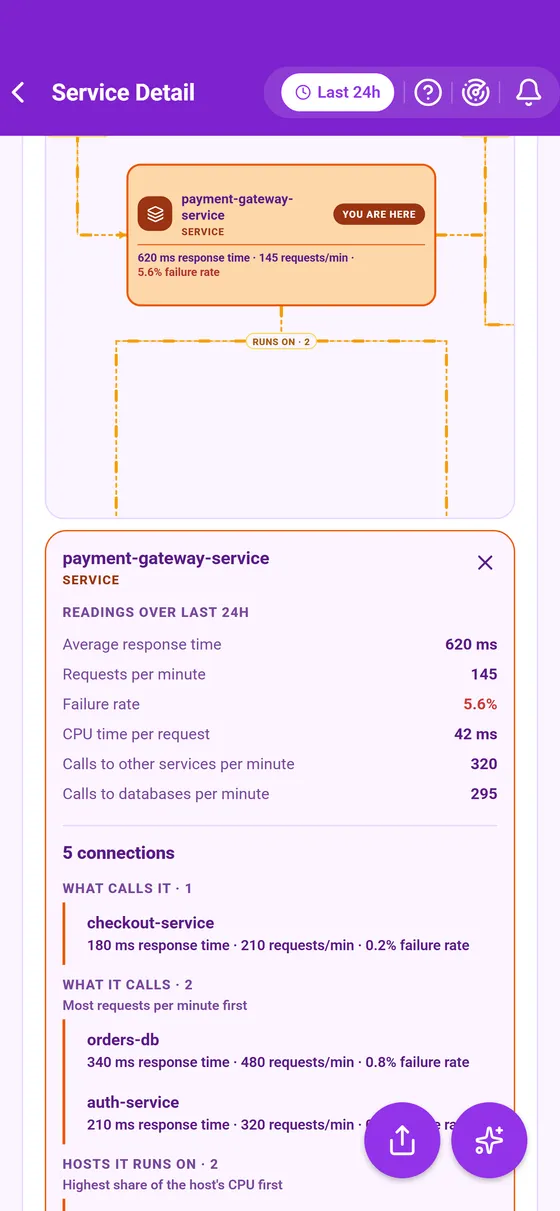
Colour shows how far a node sits from the item the page is about, never its health: You are here, Directly connected and Indirectly connected. Each line carries a word for the connection, such as calls or runs on, with an arrow for its direction. A faded node and its line are a call with no request in your time window.
Moving around it
Drag inside the map to move around it and pinch to zoom. Fit view frames it again, and Full view opens it on a screen of its own, keeping everything you had set. Three controls change what a tap on a node does:
- Search finds a node by part of its name, folded branches included.
- Focus traces a node: it and everything it connects to light up, everything else greys back, and a pulse runs along each line the way its traffic runs.
- Metrics puts each node's readings on the map.
Metrics mode
With Metrics on, every node carries its own readings, each named for what it measures: a service's response time, requests a minute and failure rate, a host's CPU, memory and disk, and an application's Apdex, users and sessions. On a problem's map they cover the problem's own time; elsewhere, the page's time window. A reading past a warning line shows in amber, and past a critical line in red.
What sits between two nodes is read too: a host under a service shows what that service's process takes of the host, such as its share of the host's CPU. Monitoring does not count the calls between two particular services, so a call carries no number of its own and reads as what each of its ends measures.
Tap a node in this mode to open a panel with its readings in full and its connections, ranked by the figure that matters most for each kind. An Admin, whose role opens problems but not services, hosts or applications, has no Metrics button on a problem's map, since there would be nothing to read.
This page describes Curade Mini 1.0.0.